Why did my WP Engine bill increase?
WordPress.com: hosted service. WordPress.org: free software. WP Engine: a separate host.
Renewal: compare invoice lines.
Public sources read October 1, 2026. No customer invoice, account offer or code redemption was tested. Start with your account's plan and contract; the rules below identify what to ask billing.
Which WordPress bill are you looking at?
WordPress.com's official comparison separates its hosted service from the free software downloaded through WordPress.org. The software does not include paid hosting or a domain. WP Engine sells its own managed hosting plans; a WordPress.com discount does not establish eligibility for a WP Engine order.
The annual/monthly coupon discussion and student-publication renewal discussion concern WordPress.com. They help explain the naming confusion, but are not WP Engine renewal evidence.
Does WP Engine have an official promo code?
The official plan builder contains a discount-code field. In the public text read for this review, we did not establish a current general code, its amount or renewal eligibility. A field alone is not a working offer. Ask the issuer and WP Engine to confirm the eligible plan, customer status, billing term, expiry and price after the promotion.
WP Engine has documented promotional codes: its WordCamp Asia 2023 article described a new-customer event offer and told attendees to obtain the code at the booth. The article's later update date does not turn that event into a current offer. No historical or third-party code is presented as redeemable here.
Why is my renewal higher?
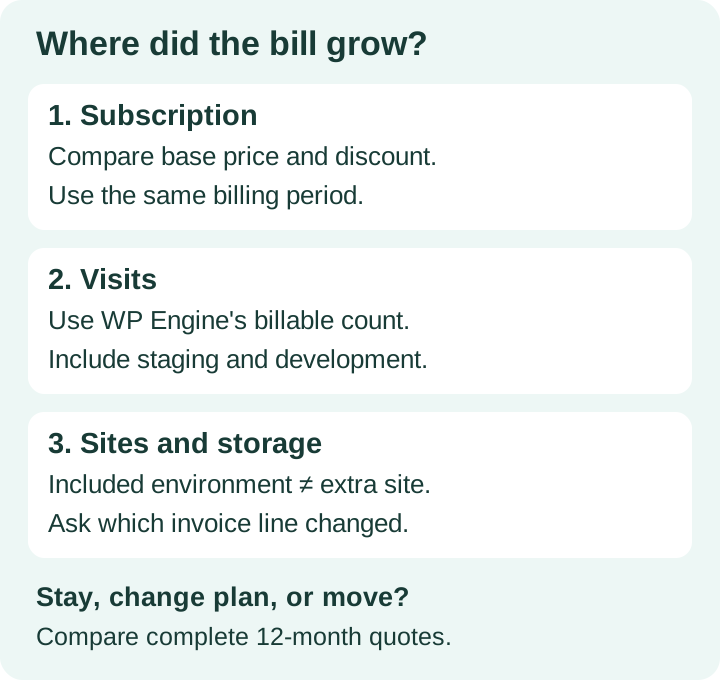
A higher total can reflect a changed base rate, an ended introductory discount, a different service period, extra sites or products, usage charges, or taxes. Those are items to investigate, not a diagnosis of your account. Put the previous invoice beside the renewal notice and compare the same service period and currency.
WP Engine's invoice documentation directs billing-authorized users to Billing → Invoice. Download the detailed invoice: it separates service dates, plan, tax, product extensions, overages and credits. If your agency login lacks billing access, have the account owner or a user with billing permissions obtain it.
| Compare | Ask billing |
|---|---|
| Base subscription and dates | What changed in the base price or discount? What is the next payable renewal amount and date? |
| Sites, storage and product extensions | Which items were added, when, and which can be removed without losing required features? |
| Usage charges and credits | Which environment and billing month generated the charge? Is there an error to investigate? |
Send the account name, invoice numbers and relevant usage details through WP Engine's private support channel. Ask for a written explanation and a revised quote before deciding to stay or move. A widely shared complaint cannot establish your price increase.
How does WP Engine count visits?
Its billable-visit documentation counts a unique IP per UTC day for dynamic requests. Static-only requests, known and suspected bots, and requests returning 403 are excluded. Monthly totals combine the environments on the plan. These counts can differ from Google Analytics sessions; compare the portal's Usage figures and request a traffic investigation if something looks wrong.
The official overage schedule lists $2 per 1,000 excess monthly visits for Startup, Professional, Growth, Scale, Agency Essentials, Agency Plus and Agency Pro. That list does not establish the rate for every custom or newer plan. Check your contract. Annual prepayment does not remove monthly overage invoices.
Illustration: at that published rate, 20,000 excess visits cost $40 before tax. If a larger plan's otherwise comparable monthly cost is $60 higher, visit charges alone reach $60 at 30,000 excess visits. This is arithmetic using a hypothetical upgrade quote, not a quoted plan price or a rounding policy. Compare multiple months and the larger plan's other limits before upgrading.
Is staging free, or can it affect my bill?
WP Engine's plan-management guide treats Production, Staging and Development as environments within one site. Additional sites and storage are separate purchasable items. Its visit rules nevertheless aggregate all environments. An included staging environment can contribute usage; that is different from a separate charge for an additional site.
Map each staging copy to its parent site, check its traffic and storage, then ask billing which line actually increased. Request an environment-level explanation and the contract provision for any alleged staging charge. Review access to unused copies with your developer; confirm backups and dependencies before removing anything. We have not established that WP Engine converted everyone's free staging into a new paid product.
Can I downgrade instead? The same plan-management guide checks the target plan's sites and storage limits, plus bandwidth and visits over the previous 30 days. Reducing today's usage may not immediately satisfy that window. Ask billing about eligibility and timing; do not assume that removing one staging copy automatically permits a downgrade.
Would Cloudways avoid the same visit charge?
In one agency discussion, a commenter suggested a DigitalOcean server through Cloudways. Treat that as a candidate to price, rather than a performance comparison or proof of savings.
Cloudways Flexible lists server resources with unmetered visits and multiple websites. For that product, DigitalOcean server sizing offers a different billing basis from WP Engine's listed visit charges. Enough CPU, RAM, disk and bandwidth are still needed for your production sites and staging copies.
The Cloudways billing guide includes server usage, enabled add-ons, and possible bandwidth or storage charges depending on configuration. Budget for backups, required email and support options too. Request a Flexible quote for your workload; this comparison does not price Autonomous or another Cloudways product. A lower entry price is not a quote for an agency's whole portfolio.
What should an agency compare before moving?
Hosting + forecast usage + required add-ons + migration + subscription overlap + administration time = your comparison total.
Keep tax separate and record the next renewal amount and date. Use your own invoices and destination quotes.
Inventory production sites, staging copies, storage, peak workload, plugins, scheduled jobs, email delivery and recovery needs. Ask the destination to size that inventory, state migration coverage and quote backups and support. For twenty client sites, one minimum-size server is not an established fit.
Before ending the old service, keep independent backups, confirm cancellation timing in your contract, and check the destination's restores, forms, scheduled tasks, transactional email, HTTPS and DNS. Assign the migration work and any ongoing administration to a person; include that time in the quote comparison.
Quick answers
Will a new-customer WP Engine coupon reduce an existing renewal?
Only if its terms cover that account and renewal. No universal renewal code was verified in this review; ask billing for an account-specific quote.
Does annual billing eliminate overages?
No. The published visit schedule bills excess usage monthly even when the subscription is annual.
Should I move because someone says WP Engine raised prices severalfold?
Compare your own invoices. In the billing-complaint discussion, other customers disputed the sweeping price claim. Individual experiences are not a published tariff or your account's history.
Read the dated source record · Source-checking method · Cloudways offer source check. This guide uses no affiliate tracking links.