WP Engine vs Kinsta: what will renewal cost?
A $31 monthly saving can disappear with usage. WP Engine lists $330/month for an existing Scale subscription's next renewal; Kinsta Lead lists $299/month. These are different plans, not equivalent quotes.
For 20 sites, compare your renewal and required capacity, the billing meter, and migration payback before switching.
Names first: WordPress.org supplies free software; WordPress.com sells a hosted service. WP Engine and Kinsta are separate managed hosts. Free software still needs hosting. See the distinction.
Official public pages read October 1, 2026. USD before tax. No customer invoice or checkout was verified for this comparison. Calculations below are labeled examples, not observed bills or performance tests.
Compare the same billing period
WP Engine's existing-subscription price notice lists monthly USD renewal rates of $35 for Startup, $65 for Professional, $130 for Growth and $330 for Scale, effective at the next renewal on or after March 11, 2026. It is not a new-customer checkout quote. Match the plan name, currency and notice to your account.
| Option | Monthly billing / 12 monthly charges | Annual prepayment | Capacity and terms to match |
|---|---|---|---|
| WP Engine Scale, existing subscription | $330 / $3,960 if unchanged | Obtain the account's annual quote. $3,960 is not a verified annual-plan invoice. | Use the existing contract's site, visit, storage and backup allowances. |
| Kinsta Lead | $299 / $3,588 | $2,990 upfront; $249.17/month equivalent | 20 sites; 275 GB server bandwidth; 60 GB storage; 1,000 GB CDN; 14-day backups |
| Kinsta Agency 20 | $340 / $4,080 | $3,400 upfront; $283.33/month equivalent | 20 sites; choose 500,000 visits OR 250 GB server bandwidth; 50 GB storage; 1,000 GB CDN; 30-day backups |
Kinsta amounts and allowances come from its pricing table; they are current list prices, not guaranteed future renewals. Annual equivalents describe prepaid costs, not monthly instalments. Twelve monthly payments assume an unchanged rate and exclude extras. Lead and Agency 20 also differ in backup retention, so their site counts alone do not establish equivalent service.
What about WP Engine's introductory deal? Its current plan page limits first-year pricing and associated coupons to new Essential customers, excluding renewals and upgrades. We did not establish a current three-year offer or a rendered new-customer checkout amount. Do not attach today's Essential capacities to an older Scale contract. Record the offer's total due, term, renewal amount and renewal term together.
Kinsta's first-month eligibility rules name selected entry plans; they do not extend that promotion to Lead or Agency 20. The table above does not subtract a free month.
Visits, server bandwidth and CDN are different meters
Kinsta's plan-selection guide makes Launch through Lead bandwidth-only. Lead's estimated visitor figure is guidance, not a billed visit allowance. Agency 20 has two billing choices. Never add a visit overage to a Lead server-bandwidth calculation.
| Charge | WP Engine | Kinsta |
|---|---|---|
| Excess visits | $2 / 1,000 on the published Startup, Professional, Growth, Scale and Agency Essentials/Plus/Pro schedule; check other contracts. | $0.50 / 1,000 on visits-based plans. |
| Server bandwidth | Use your contract; no universal rate established here. | $0.50 / excess GB on bandwidth-based plans. |
| Storage | Use your contract and any storage extensions. | $2 / excess GB/month, measured daily and prorated. |
| CDN bandwidth | Use your contract's included service and limits. | $0.05 / excess GB. |
Sources: WP Engine overage schedule and Kinsta overage rules. WP Engine bills monthly visit overages even on annual subscriptions. A Kinsta upgrade does not erase overages already incurred.
If each account separately records 20,000 excess billable visits, the listed rates produce $40 at WP Engine and $10 on a Kinsta visits-based plan. That does not prove identical real traffic would produce identical billable counts.
WP Engine counts qualifying unique IPs per UTC day across environments, with specified exclusions. Kinsta's current analytics rules exclude staging requests from billable visits/server bandwidth. CDN and edge-cache requests can still count as Kinsta visits while avoiding server bandwidth. Use each billing dashboard; Google Analytics sessions and a guessed GB-per-visitor conversion are not substitutes.
A 20-site Lead example you can recalculate
Assumed month: 300 GB billable server bandwidth, 75 GB live storage throughout the month, and 1,100 GB billable CDN traffic. Monthly Lead subscription; no other extras.
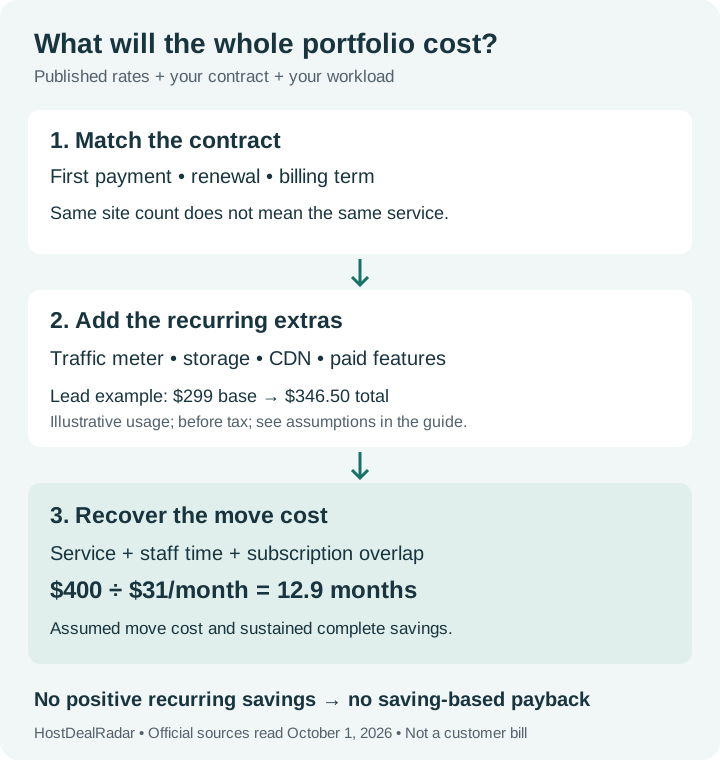
$299 + (300 − 275) × $0.50 + (75 − 60) × $2 + (1,100 − 1,000) × $0.05 = $346.50 before tax.
A 20 GB storage add-on costs $20/month. If active for this entire month, storage allowance becomes 80 GB and the same scenario costs $336.50: $299 + $12.50 + $20 + $5.
This is an illustration using the published rates above. The add-on saves $10 under these assumptions. Daily storage changes or partial-month activation change the result. Compare $336.50 with your complete WP Engine bill; the $31 difference between base prices has already disappeared even before migration.
How do twenty sites and their staging copies count?
WP Engine's plan guide includes Production, Staging and Development within a site. Extra sites and storage can be separate purchases; included environments can still contribute billable visits under its counting rules.
Kinsta's staging documentation excludes staging disk from the plan's storage allocation. Premium Staging CDN usage still counts toward CDN consumption. Standard staging has lower resources and should not stand in for production capacity. Check legacy plans separately.
The Premium Staging add-on is $20 per environment/month, prorated. One optional premium environment is not the same purchase as another production site. Inventory production sites, included staging and paid environments in separate rows before adding up an agency quote.
Why might a WordPress or plugin update appear later?
| Stage | What to check at WP Engine |
|---|---|
| Core version rollout | Major releases undergo platform testing before rollout. A major update can be deferred 30 days after it becomes available on the platform. Minor security/maintenance releases cannot be deferred and follow a shorter testing process. Core policy. |
| Finding an available version | WordPress.org and the WP Engine mirror are selectable update sources, with account and site settings. Failover can override a choice; WP-CLI continues using the mirror. A repository delay is a different question from core-release testing. Update-source guide. |
| Installing and checking plugins | Smart Plugin Manager separately schedules plugin/theme updates and uses visual checks and rollback. Check its schedule and results; a visual check does not detect every possible failure. Manager documentation. |
These distinctions can explain a delay without diagnosing a particular forum report. They do not establish that every delayed plugin has been held for compatibility testing.
For the comparison budget, Kinsta Automatic Updates adds visual testing and rollback for $3 per enabled environment/month after its free first month: 20 enabled environments cost $60/month, or 40 cost $120/month. Native WordPress auto-updates are a different option. WP Engine's plan table lists its plugin/theme manager as optional on Essential and one licence included on Core/Enterprise; obtain the price and licence coverage needed for your portfolio.
Free migration service still leaves work to price
| Move | Published service | Your remaining work |
|---|---|---|
| WP Engine → Kinsta | Qualifying standard WordPress migrations are free and normally handled Monday–Friday. Expedited migration is $49/site; Agency credits may cover it. | Confirm eligibility, test the destination, coordinate DNS and launch, and preserve changing orders/member data during cutover. |
| Kinsta → WP Engine | Essential includes the automated migration plugin. Core lists managed migration services; confirm your scope and quote. | Test and connect the domain; changing source content may need another sync. A single multisite subsite and Apache .htaccess rules need special handling. |
Sources: Kinsta migration instructions, WP Engine included services and migration plugin instructions. Ask about LargeFS, multisite and reverse proxies before scheduling. Confirm forms, email delivery, scheduled jobs, HTTPS and restores before ending the old subscription. An online store may need a maintenance window to avoid losing writes.
One-time move cost = migration service + staff hours × hourly cost + overlapping subscriptions + other necessary setup.
Payback in months = one-time move cost ÷ positive monthly savings after usage, required features and administration.
Illustration: 6 hours × $50 + $100 overlap = $400. At a sustained $31/month saving, recovery takes about 12.9 months. These labour and overlap inputs are assumptions. If the new total costs more, this saving-based payback does not exist.
Quick answers before choosing
Is Kinsta always cheaper than WP Engine?
No. Choose a suitable plan and count usage, backup needs, paid environments and labour. Lead's lower listed base does not make it an equivalent replacement for every Scale contract. Agency 20 starts above the listed $330 Scale renewal before any extras.
Is managed hosting worth a 100% premium?
Price the workload and included responsibilities first. If the actual premium were $100/month and your team's time cost $50/hour, saving two hours of administration would offset it. That is a decision formula, not an observed performance or time-saving result for either host.
Can a coupon fix an existing renewal increase?
Only terms covering that renewal can establish eligibility. Compare the written renewal notice with a retained-customer quote and the full migration alternative. Use our WP Engine bill investigation guide to identify the increased line first.
Dated sources and calculation assumptions · Research method. No affiliate tracking links are used in this guide.